


Netflix
3.9909.88K Reviews
App Specs
- Version
- Varies with Device
- Updated On
- License
- Free
- Downloads
- 1,000,000,000+
- Developer
- Netflix, Inc.
- Categories
- Entertainment
- Platform
- Android, iOS
Screenshots

 Analysis by AppCompare
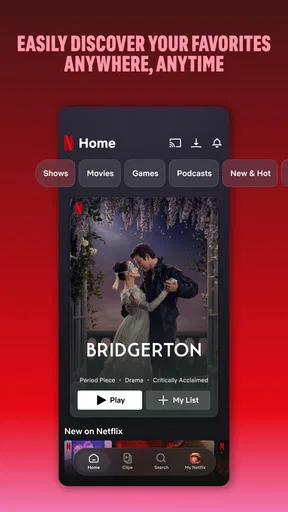
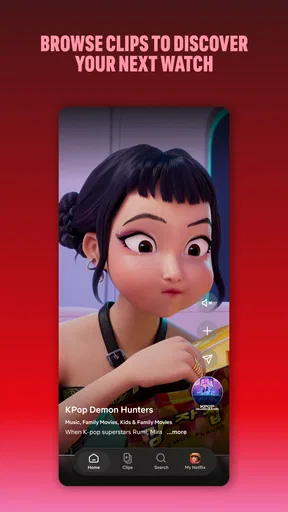
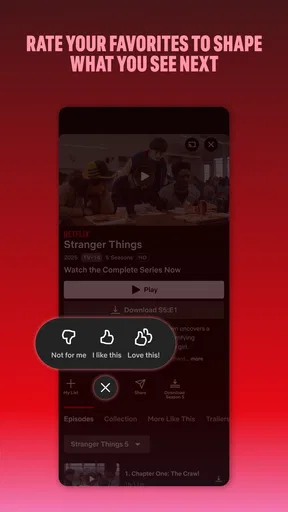
When I want something to watch without planning the evening in advance, I often end up opening Netflix. The app’s strongest everyday feature is its personalized recommendation feed: instead of making me search from scratch, it gives me a starting point based on what I have watched. That can be genuinely handy when I have half an hour to spare, though it is still a guide rather than a guarantee that I will like the next suggestion.
Recommendations make browsing feel less like work
The service is an entertainment app from Netflix, Inc., and its main appeal is having films and TV series gathered in one place. In practice, I find the recommendations most useful when I treat them as a shortlist, not as a verdict on my taste. A title can appear because it shares broad traits with something I watched, while missing the particular reason I liked that earlier show. When the first row does not help, I browse by mood or genre instead of repeatedly opening whatever the app puts in front of me.
That small change makes the experience better: I use the feed to discover possibilities, then make the final choice myself. If I am looking for a tense film, for instance, I do not assume every suggested thriller will suit the evening. I check the title’s description and decide whether its premise sounds right. Recommendations save me from starting with a blank screen, but a little deliberate browsing still matters.
Guides and Analysis on Netflix
A low-effort choice for an ordinary evening
Picture getting home tired, with no appetite for a long search and no agreement yet on what to watch. I can open the app, scan the personalized rows, and usually find a few plausible options faster than I could by scrolling through a general video platform’s broad mix of clips and uploads. If nothing catches my eye, I can switch to a familiar series in Continue Watching rather than trying to remember where I left off.
That is where the app fits best for me: relaxed viewing when I want films or episodes, not a complicated setup or a social feed. It also works for a household with different tastes because separate profiles help keep viewing histories and suggestions distinct. If one person watches crime dramas and another prefers comedies, having separate spaces makes the home screen more useful for each of them.
The distinction is practical rather than perfect. A profile can reduce crossed recommendations, but it still depends on people choosing the right one before they start watching. I would make that a household habit, especially when a shared device stays signed in. It is a simple step that helps recommendations stay relevant instead of letting one person’s viewing reshape another person’s rows.
Getting Started with Netflix
First things first, installing Netflix is a breeze. Whether you’re on Android or iOS, just head to the app store, hit that download button, and you’re ready to roll. Once you open the app, you’re greeted with a clean and intuitive interface. Honestly, it feels like Netflix knows exactly what you want before you even know it yourself. The recommendation algorithm is spot on, suggesting shows and movies based on what you’ve previously watched.
Worth Reading Before You Choose

Baby Panda World Brings Quick Play to Modern Phones, but Its Game Library Feels Busy

ESPN’s Live Game View Makes Following Close Games Easier

QuizzLand Review: A Good Fit for Short Trivia Breaks, Not Every Player

Basketball Stars: Multiplayer Is Fast, but Can It Recover When Matches Go Wrong?

WEBTOON Turns Phone Updates Into a Better Reading Routine

Link to Windows Runs on Shared Habits, Not Social Feeds
Content Galore
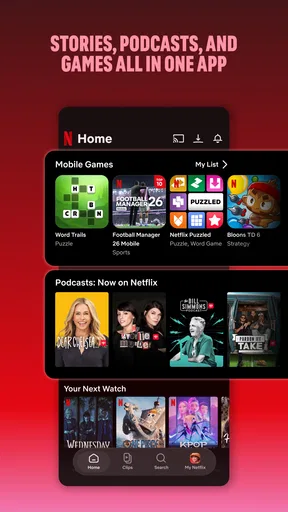
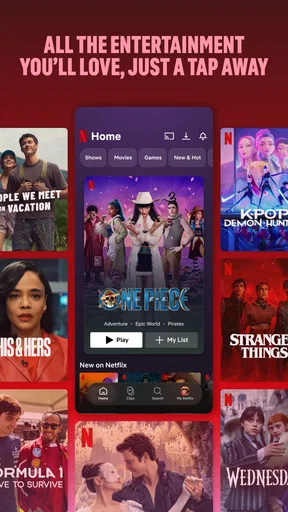
This is where Netflix truly shines. The variety is insane! From blockbuster movies to binge-worthy series, documentaries, and even stand-up specials, it’s a treasure trove of entertainment. There’s something for everyone - whether you’re into sci-fi, drama, romance, or horror. And not to mention the Netflix Originals that people can’t stop raving about. "Stranger Things," anyone?
One thing I particularly love is the ability to download content for offline viewing. Perfect for those long flights or when you’re stuck somewhere without Wi-Fi. Just a quick tip, though: make sure you have enough space on your device because some of these shows are addictive!
Downloads are useful when your connection is not
Offline viewing changes how I plan a trip: I choose a film or a few episodes while I have a reliable connection, download them in advance, and check that they are ready before leaving. That last check is worth doing. It is much less frustrating to confirm your choices at home than to discover during a commute or flight that you never finished preparing them.
I also try to be selective about what I save. A long series can take up more room than I want to give it, so I download only the next episode or two rather than an entire season. For a short journey, one film may be enough; for a longer stretch without internet, a mix of episodes gives me more flexibility. Downloads are best understood as preparation for offline time, not a reason to fill a phone with everything I might watch someday.
The trade-off is that downloaded viewing takes a little forethought and device storage. If I am leaving unexpectedly, the feature cannot help with a title I did not prepare. When I know I will be away from Wi-Fi, though, even a small selection makes the app much more dependable as a travel companion.
User Experience and Features
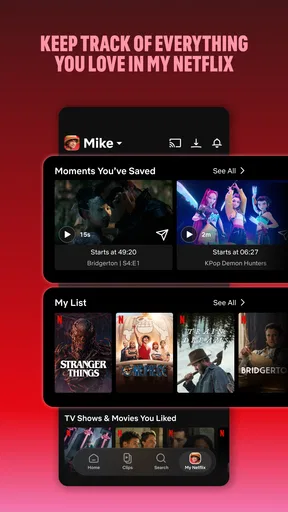
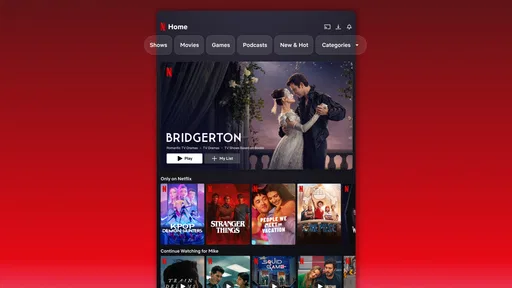
Navigating through the app is as smooth as butter. You’ve got your profile, and within it, Netflix offers personalized recommendations, a "Continue Watching" section, and even the ability to create multiple profiles. This is a lifesaver if you’re sharing your account. No more accidentally spoiling episodes when someone else is watching the same series.
Plus, the app's parental controls are a bonus for families. You can set up kids' profiles, ensuring they only access child-friendly content. It’s a win-win situation, keeping the little ones entertained while you dive into your favorite thriller.
What to expect from the wider service
The app is free to install, but watching is part of Netflix’s subscription service, so downloading it should not be confused with getting every film and episode at no cost. I would decide whether it makes sense by thinking about how often I will use it and whether its catalogue suits my tastes, rather than assuming the app itself settles the subscription question. The service is rated Teen, which is useful context for families, but parents should still choose suitable viewing and make use of the kids’ profile and parental controls.
There is also a difference between a large catalogue and a permanent catalogue. Titles can come and go, so I would not build a plan around the assumption that a particular film will always be available. If I spot something I want to watch, I try not to leave it indefinitely in my mental “later” pile. That limitation matters most to viewers who want a fixed collection they can return to for years.
Compared with free video platforms, this is a more focused place to watch full-length films and series rather than a stream of creator uploads and short clips. Compared with other subscription entertainment apps, the basic decision is more personal: which service has the shows and films you actually want at the moment? I would not pay for several services automatically if I only have time to watch one. Checking your own viewing habits is more useful than choosing by catalogue size alone.
Who gets the most from it—and who may not
I think it suits people who regularly watch scripted series or films, like having a few options ready, and value a simple way to resume a show. Families can benefit from separate profiles and kids’ viewing controls, while travellers may appreciate preparing downloads before a stretch without internet. The recommendation feed is particularly helpful for people who are open to discovering something new but do not want to spend ages searching.
It is less compelling if you rarely watch long-form entertainment, prefer live programming, or want a permanent personal library rather than a changing selection. It may also be a poor fit if you already subscribe to another service that consistently has the titles you want. In those cases, a free video platform or a different subscription service may fit better. I would not keep this one just because it is familiar; the value comes from actually finding things to watch.
Netflix is a major entertainment app, developed by Netflix, Inc., with a 3.9 average from around 15 million ratings and more than a billion installs. Those figures show how widely used it is, but they do not tell me whether its catalogue matches an individual viewer’s preferences. My own recommendation is to judge it by the usefulness of its suggestions, how often you watch, and whether the available titles justify a subscription for you.
The Verdict
So, is Netflix worth it? In my book, absolutely! While some might argue about the ever-changing library and the occasional show removal, the sheer volume of content and the seamless user experience make it a must-have app. Whether you’re a movie buff or a series addict, Netflix has something for everyone.
My enthusiasm comes with a practical caveat: a broad choice is only valuable if you enjoy browsing it and find enough titles that you genuinely want to watch. I would use recommendations as a convenient first step, keep profiles distinct in a shared household, and prepare downloads before travelling. Those habits make the app more useful without pretending its suggestions are always right or its catalogue never changes.
Now, if you’ll excuse me, I’ve got a couch calling my name and a series finale to catch up on. Happy streaming!
Pros
- Extensive content library.
- User-friendly interface.
- Offline download feature.
- Multiple profiles per account.
- High-quality streaming options.
Cons
- Subscription can be costly.
- Content varies by region.
- Requires stable internet.
- Occasional buffering issues.
- Limited availability of new releases.
FAQs for Netflix
What devices are compatible with Netflix?
Netflix is compatible with a wide range of devices including smartphones, tablets, smart TVs, and gaming consoles. You can download the app on Android and iOS devices from their respective app stores. Additionally, you can stream Netflix on your computer using a web browser or through streaming devices like Roku and Amazon Fire TV.
How much does a Netflix subscription cost?
Netflix offers several subscription plans to suit different needs and budgets. Prices can vary by region, but typically you will find options like Basic, Standard, and Premium. Each plan offers different features, such as the number of simultaneous streams and access to HD or Ultra HD content. It's best to check their official website for the most current pricing in your area.
Can I download content to watch offline?
Yes, Netflix allows you to download movies and TV shows to watch offline on your mobile device or tablet. This feature is particularly useful for users who want to save on data usage or watch content without an internet connection. However, not all titles are available for download, so it's worth checking the availability of specific content.
Is there parental control available on Netflix?
Netflix provides robust parental control features to ensure a safe viewing experience for children. You can set up a Kids profile with content tailored for a younger audience and apply age restrictions. Additionally, you can use a PIN to restrict access to specific profiles, giving you peace of mind about what your family is watching.
How do I change the language settings on Netflix?
You can easily change the language settings on Netflix by accessing the profile settings. Navigate to 'Account' on the Netflix website, then select 'Language' under 'Profile & Parental Controls.' Here, you can choose your preferred language for the user interface as well as audio and subtitles, ensuring a personalized viewing experience.


